Dropping a Class

Whether you need to adjust your schedule during the schedule-change period or formally withdraw from a class later in the semester, it is important to complete the process correctly. Dropping a class can impact your financial aid eligibility, academic standing, and progress toward graduation.
Class Drop Policies
Before you finalize a drop, ensure you fully understand the state and institutional rules that regulate course withdrawals in Texas:
Under Texas state law, Senate Bill 1231, students enrolling in a Texas public college or university for the first time in Fall 2007 or later are strictly limited to a total of six (6) unexcused course drops across their entire undergraduate career.
- Any course dropped after the official Census Date of a semester counts toward this lifetime limit of six.
- Once you reach six drops, you will no longer be permitted to drop a class and will receive the grade earned at the end of the semester.
Note: Drops processed before the semester Census Day, or drops approved for documented institutional exemptions (e.g., severe illness, military deployment), do not count toward your six-drop limit.
Dropping classes can severely alter your financial aid profile:
- Satisfactory Academic Progress (SAP): Dropping courses lowers your successful completion rate (Pace). You must successfully pass at least 67% of all credit hours you attempt to keep your financial aid active.
- Repayment: If you drop or withdraw from all classes before completing 60% of the semester, you may be required to pay back a portion of your federal grants or loans immediately.
- Before Census Day: Dropping a course on or before the census date removes the class completely from your academic record. No grade is given, and it does not count against your 6-drop state limit.
- Before W-Day: Dropping a course after census but before the final "W-Day" deadline will result in a permanent grade of "W" (Withdrawal) on your transcript. This does not impact your GPA, but it counts as an attempted course and uses one of your 6 state drops.
- After W-Day: You cannot drop a class after W-Day. Your instructor must assign a standard letter grade (A-F) based on the work completed.
How to Drop Online
Most students can drop classes directly through the student portal prior to the semester's formal "W-Day" deadline. Follow these steps to drop a course online:
- Log into Navigate.
- Click on the link Schedule Courses
- Select the term you are dropping a class from
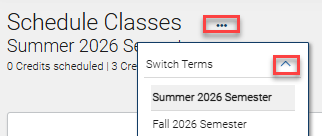
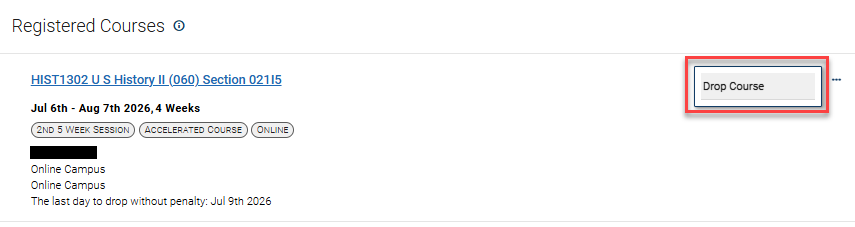
- On the righthand side below the calendar view, click on the 3 dots next to the class
you want to drop and select drop class
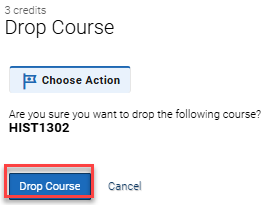
- Ensure you selected the correct course to drop and click Drop Course
Questions? We're here to help.
Admissions Office:
Doyle Family Administration Building
Suite 111-02A
Admissions Hours:
- Monday–Tuesday: 8 a.m. – 7 p.m.
- Wednesday–Friday: 8 a.m. – 5 p.m.